Archiver ou retirer un mandat
Archivieren oder entfernen Sie ein Mandat
Archive or remove a mandate
Archive or remove a mandate
Archiviare o rimuovere un mandato
Arquivar ou remover um mandato
Archivar o eliminar un mandato
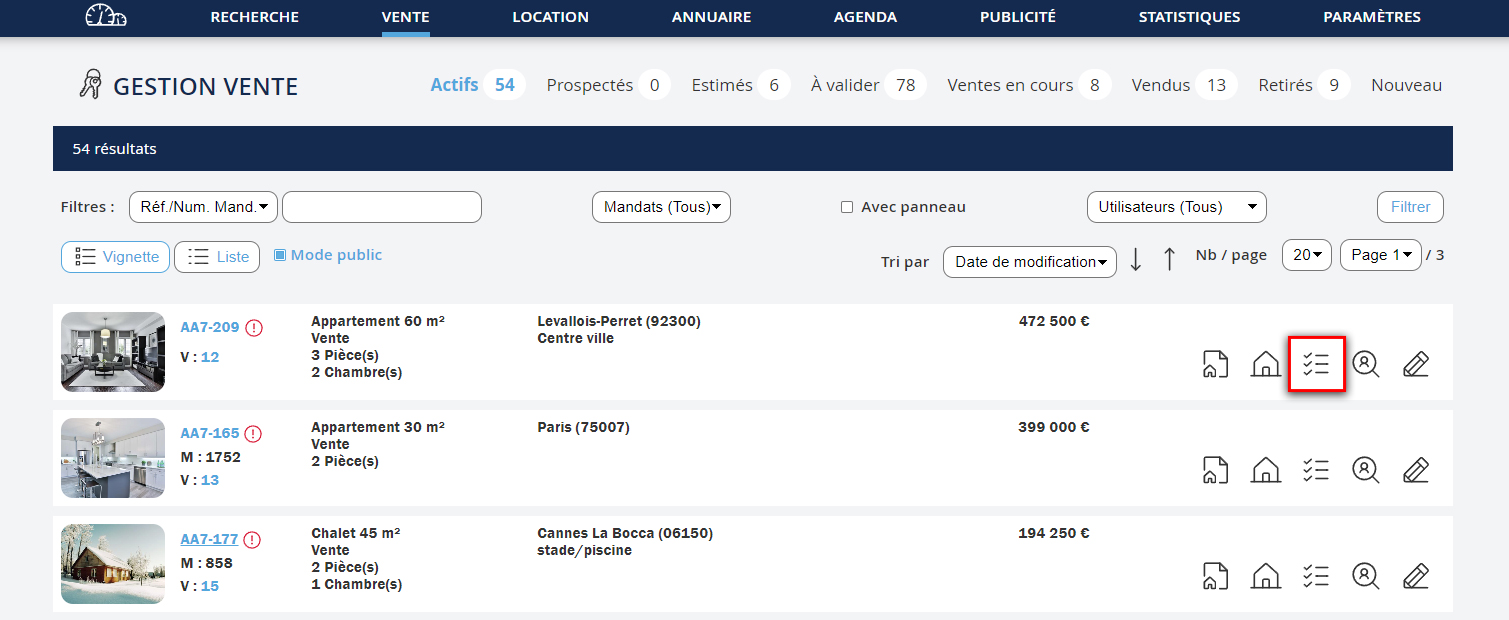
Pour supprimer un mandat de votre base vous devez passer par l’icône  .
.
L’archivage ou la suppression d’un mandat se fait en trois étapes :
Um ein Mandat aus Ihrer Datenbank zu löschen, müssen Sie auf das Symbol klicken.
Das Archivieren oder Löschen eines Mandats erfolgt in drei Schritten:
To remove a mandate from your database, you need to click on the icon .
Archiving or removing a mandate is done in three steps:
To remove a mandate from your database, you need to click on the icon .
Archiving or removing a mandate is done in three steps:
Per eliminare un mandato dalla tua base dati, devi fare clic sull'icona .
L'archiviazione o la rimozione di un mandato avviene in tre fasi:
Para remover um mandato da sua base, deve clicar no ícone .
O arquivamento ou remoção de um mandato é feito em três etapas:
Para eliminar un mandato de su base de datos, debe hacer clic en el icono .
El archivado o la eliminación de un mandato se realiza en tres pasos:
Etape 1
Schritt 1
Step 1
Step 1
Fase 1
Passo 1
Paso 1
- Cliquez sur "Vente" ou "Location" dans le menu
- Et allez dans le suivi  du mandat concerné
- Klicken Sie auf "Verkauf" oder "Vermietung" im Menü
- Und gehen Sie zum Follow-up des betreffenden Mandats
- Click on "Sale" or "Rental" in the menu
- Then go to the follow-up of the relevant mandate
- Click on "Sale" or "Rental" in the menu
- Then go to the follow-up of the relevant mandate
- Clicca su "Vendita" o "Affitto" nel menu
- E vai al monitoraggio del mandato pertinente
- Clique em "Venda" ou "Arrendamento" no menu
- E vá para o acompanhamento do mandato em questão
- Haga clic en "Venta" o "Alquiler" en el menú
- Y vaya al seguimiento del mandato correspondiente


Etape 2
Schritt 2
Step 2
Step 2
Fase 2
Passo 2
Paso 2
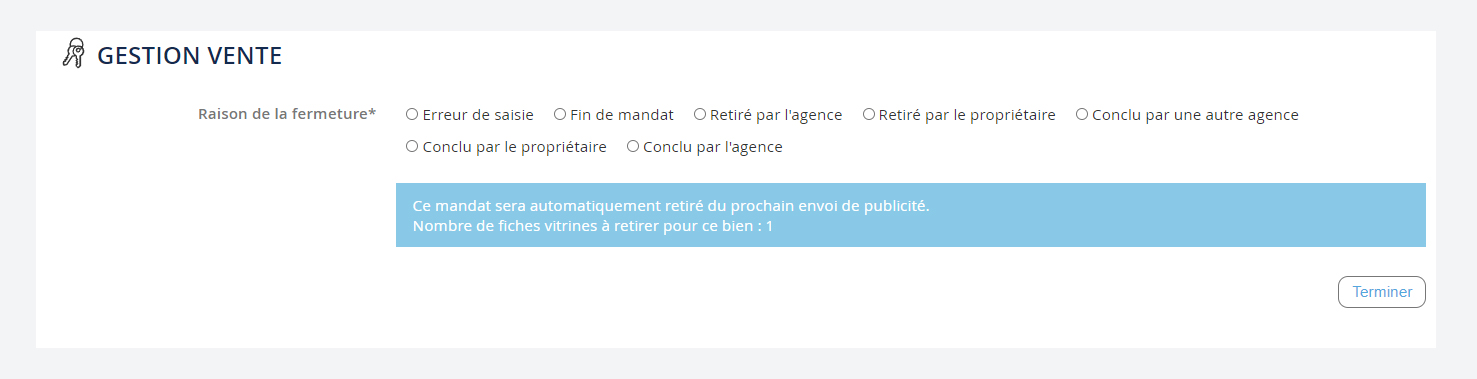
- Cliquez sur " Archiver " pour ouvrir le formulaire.
- Klicken Sie auf " Archivieren " um das Formular zu öffnen.
- Click on " Archive " to open the form.
- Click on " Archive " to open the form.
- Clicca su " Archivia " per aprire il modulo.
- Clique em " Arquivar " para abrir o formulário.
- Haga clic en " Archivar " para abrir el formulario.





Etape 3
Schritt 3
Step 3
Step 3
Fase 3
Passo 3
Paso 3
- Pour finaliser votre action, vous devez sélectionner un motif - Selon le motif sélectionné, vous verrez différents champs apparaître. NB : Ces informations sont importantes pour améliorer le calcul de vos prochaines estimations. A propos de l’archivage d’un mandat : - Si vous remplissez la Date de vente, alors le Montant de la vente et le Prix net vendeur deviennent des informations obligatoires. Par conséquent, s’il vous manque une de ces informations ne renseignez pas les autres. - Un mandat archivé reste accessible dans le sous menu Retirés. - Le calcul des estimations du logiciel, est programmé à partir des informations sur les biens actifs ainsi que les biens archivés. Cf chapitre Faire une estimation.
- Um Ihre Aktion abzuschließen, müssen Sie einen Grund auswählen
- Je nach ausgewähltem Grund werden verschiedene Felder angezeigt.
NB: Diese Informationen sind wichtig, um die Berechnung Ihrer zukünftigen Schätzungen zu verbessern.
Über das Archivieren eines Mandats:
- Wenn Sie das Verkaufsdatum ausfüllen, werden der Verkaufspreis und der Nettoverkaufspreis zu Pflichtfeldern. Wenn diese Informationen fehlen, füllen Sie die anderen nicht aus.
- Ein archiviertes Mandat bleibt im Untermenü Entfernt zugänglich.
- Die Schätzungen der Software basieren auf den Informationen zu aktiven und archivierten Immobilien. Siehe Kapitel Schätzung durchführen.
- To finalize your action, you must select a reason
- Depending on the selected reason, different fields will appear.
NB: This information is important to improve the calculation of your future estimates.
About archiving a mandate:
- If you fill in the Sale date, then the Sale amount and the Net seller price become mandatory fields. Therefore, if any of this information is missing, do not fill in the others.
- An archived mandate remains accessible in the Removed submenu.
- The software estimates are based on information from both active and archived properties. See the chapter Making an Estimate.
- To finalize your action, you must select a reason
- Depending on the selected reason, different fields will appear.
NB: This information is important to improve the calculation of your future estimates.
About archiving a mandate:
- If you fill in the Sale date, then the Sale amount and the Net seller price become mandatory fields. Therefore, if any of this information is missing, do not fill in the others.
- An archived mandate remains accessible in the Removed submenu.
- The software estimates are based on information from both active and archived properties. See the chapter Making an Estimate.
- Per finalizzare l'azione, devi selezionare un motivo
- A seconda del motivo selezionato, appariranno diversi campi.
NB: Queste informazioni sono importanti per migliorare il calcolo delle tue stime future.
Riguardo l'archiviazione di un mandato:
- Se compili la Data di vendita, allora l'Importo di vendita e il Prezzo netto per il venditore diventano informazioni obbligatorie. Di conseguenza, se manca una di queste informazioni, non compilare le altre.
- Un mandato archiviato rimane accessibile nel sottomenù Rimossi.
- Il calcolo delle stime del software è programmato a partire dalle informazioni sugli immobili attivi e archiviati. Vedi il capitolo Fare una stima.
- Para finalizar a sua ação, deve selecionar um motivo
- Dependendo do motivo selecionado, vários campos irão aparecer.
NB: Esta informação é importante para melhorar o cálculo das suas futuras estimativas.
Sobre o arquivamento de um mandato:
- Se preencher a Data de venda, então o Montante da venda e o Preço líquido vendedor tornam-se campos obrigatórios. Se faltar alguma destas informações, não preencha as outras.
- Um mandato arquivado permanece acessível no submenu Removidos.
- O cálculo das estimativas do software é feito a partir das informações sobre os imóveis ativos e arquivados. Consulte o capítulo Fazer uma estimativa.
- Para finalizar su acción, debe seleccionar un motivo
- Dependiendo del motivo seleccionado, aparecerán diferentes campos.
NB: Esta información es importante para mejorar el cálculo de sus futuras estimaciones.
Sobre el archivado de un mandato:
- Si rellena la Fecha de venta, entonces el Importe de la venta y el Precio neto del vendedor se convierten en campos obligatorios. Por lo tanto, si falta alguna de esta información, no rellene los demás campos.
- Un mandato archivado permanece accesible en el submenú Eliminados.
- El cálculo de las estimaciones del software se realiza a partir de la información sobre los bienes activos y archivados. Consulte el capítulo Hacer una estimación.