Enregistrer un bien
Register a Property
Register a Property
Ein Objekt registrieren
Registrare un immobile
Registar um imóvel
Registrar una propiedad
A savoir, pour un meilleur référencement sur tous les sites internet publicitaires, il est impératif de renseigner un maximum d’informations sur le bien que vous rentrez. Vous avez plusieurs champs pour remplir vos textes de communications (fiche client, fiche vitrine, publicité …) Il est nécessaire si vous avez un site web de vous réserver un type de texte comme par exemple « texte internet », pour le site web de l’agence. Google pénalise la duplication de contenu.
Note that, for better SEO on all advertising websites, it is essential to provide as much information as possible about the property you are entering. You have several fields to fill in your communication texts (client sheet, showcase sheet, advertising ...) It is necessary, if you have a website, to reserve a type of text such as "internet text" for the agency's website. Google penalizes content duplication.
Note that, for better SEO on all advertising websites, it is essential to provide as much information as possible about the property you are entering. You have several fields to fill in your communication texts (client sheet, showcase sheet, advertising ...) It is necessary, if you have a website, to reserve a type of text such as "internet text" for the agency's website. Google penalizes content duplication.
Wissenswertes: Für eine bessere Platzierung auf allen Werbe-Websites ist es unbedingt erforderlich, so viele Informationen wie möglich über die Immobilie anzugeben, die Sie eingeben. Sie haben mehrere Felder, um Ihre Kommunikationstexte auszufüllen (Kundenblatt, Schaufensterblatt, Werbung ...) Es ist erforderlich, wenn Sie eine Website haben, einen bestimmten Texttyp wie "Internettext" für die Agentur-Website zu reservieren. Google bestraft die Duplikation von Inhalten.
Da sapere, per una migliore visibilità su tutti i siti web pubblicitari, è essenziale fornire un massimo di informazioni sulla proprietà che stai inserendo. Hai diversi campi per compilare i tuoi testi di comunicazione (scheda cliente, scheda vetrina, pubblicità ...) È necessario, se hai un sito web, riservarti un tipo di testo come ad esempio "testo internet" per il sito web dell'agenzia. Google penalizza la duplicazione dei contenuti.
Sabe-se que, para melhorar o SEO em todos os sites de publicidade, é essencial fornecer o máximo de informações sobre o imóvel que está a registar. Tem vários campos para preencher os seus textos de comunicação (ficha do cliente, ficha de vitrine, publicidade ...) É necessário, se tiver um site, reservar um tipo de texto como, por exemplo, "texto na internet" para o site da agência. O Google penaliza a duplicação de conteúdo.
Es importante saber que, para mejor SEO en todos los sitios web publicitarios, es imprescindible proporcionar el máximo de información sobre la propiedad que está ingresando. Tiene varios campos para completar sus textos de comunicación (hoja de cliente, hoja de vitrina, publicidad ...) Es necesario, si tiene un sitio web, reservar un tipo de texto como por ejemplo "texto en internet" para el sitio web de la agencia. Google penaliza la duplicación de contenido.
Pour enregistrer un nouveau bien, vous devez :
To register a new property, you must:
To register a new property, you must:
Um eine neue Immobilie zu registrieren, müssen Sie:
Per registrare una nuova proprietà, devi:
Para registar uma nova propriedade, deve:
Para registrar una nueva propiedad, debe:
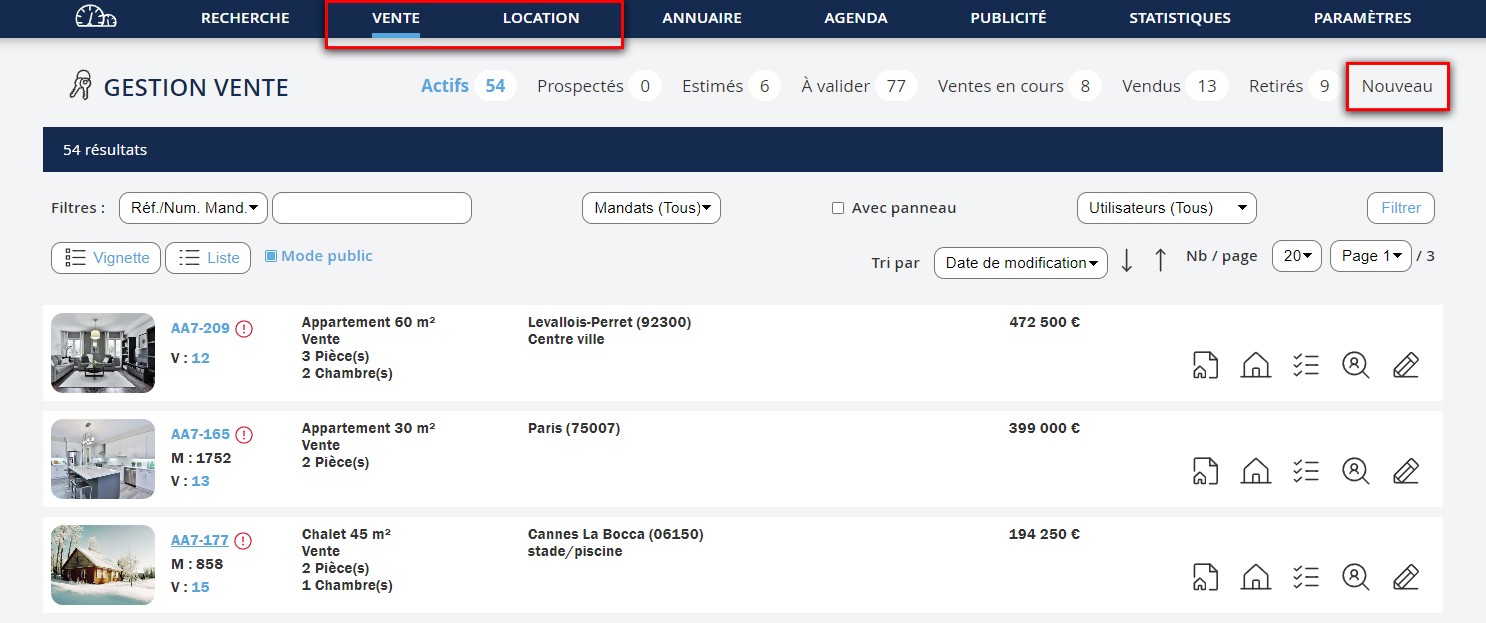
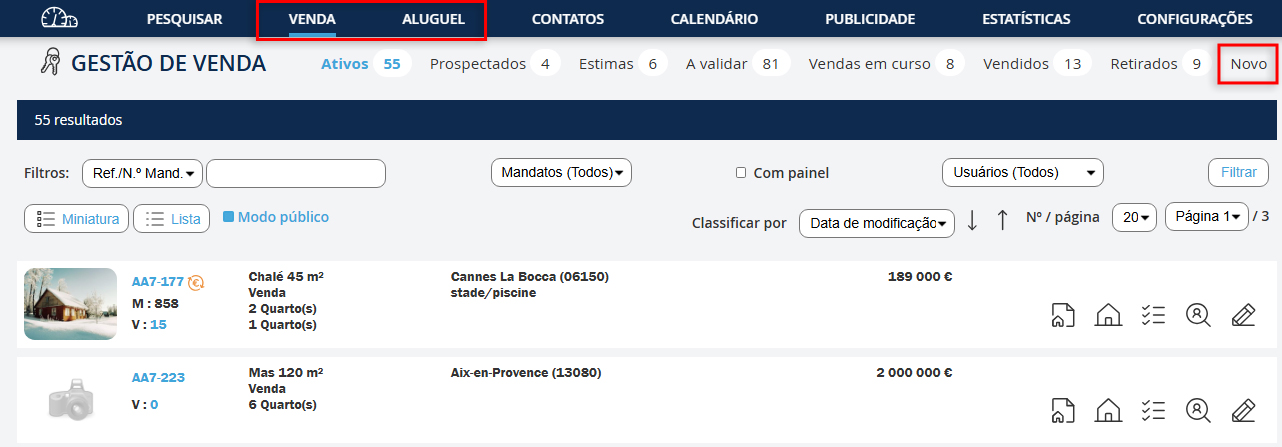
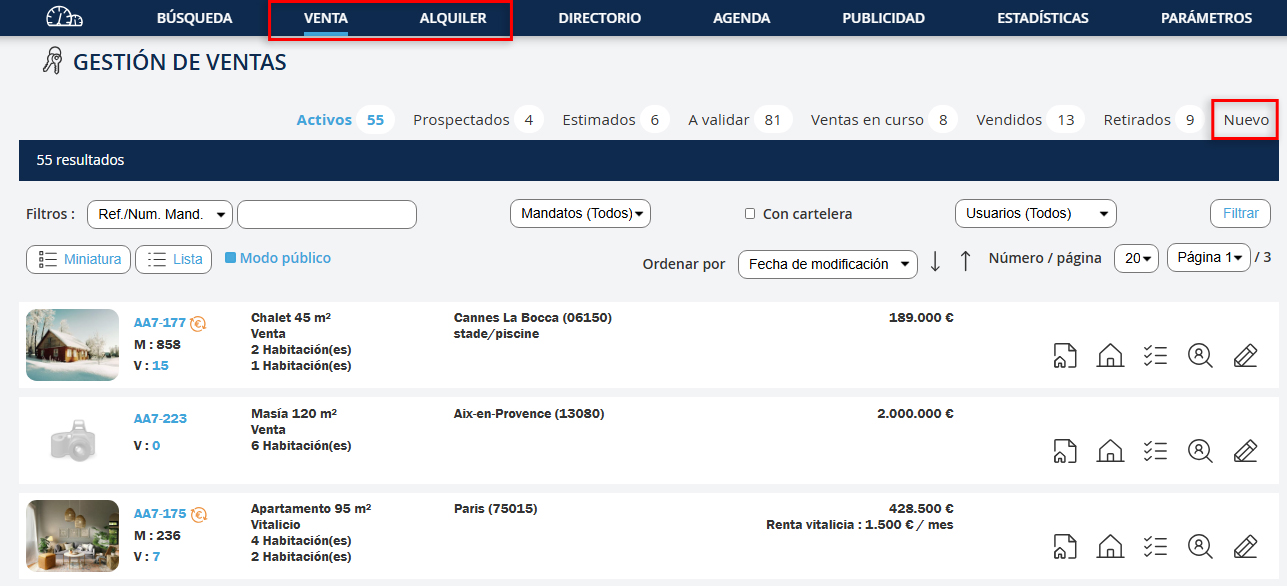
1. Dans le menu, cliquer sur "Vente" ou "Location". 2. Dans le sous-menu, cliquer sur "Nouveau".
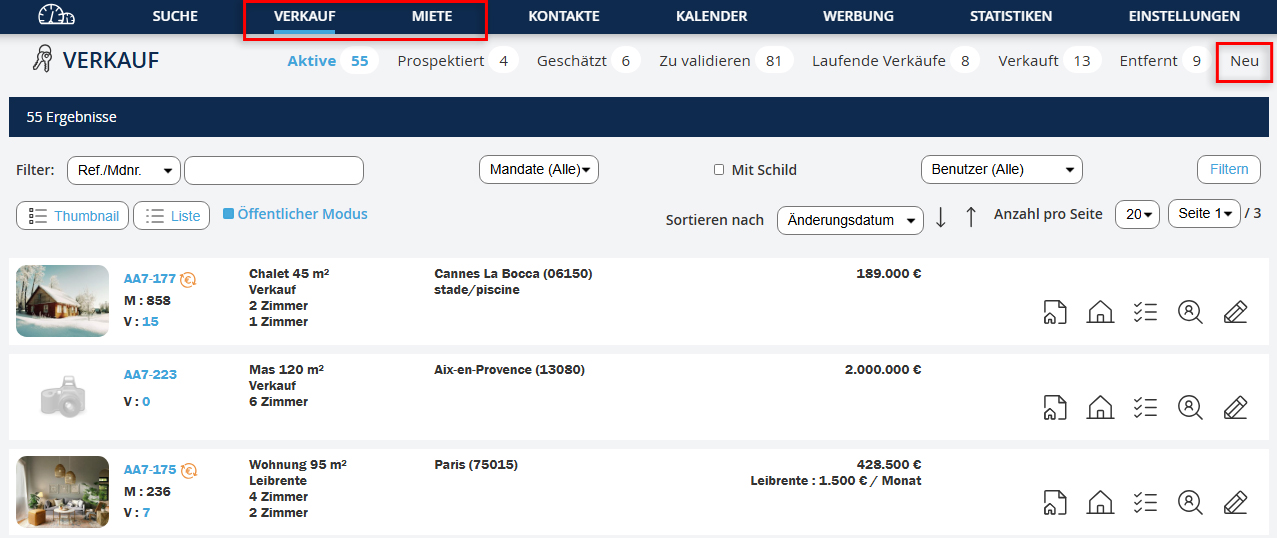
1. Im Menü auf "Verkauf" oder "Vermietung" klicken. 2. Im Untermenü auf "Neu" klicken.
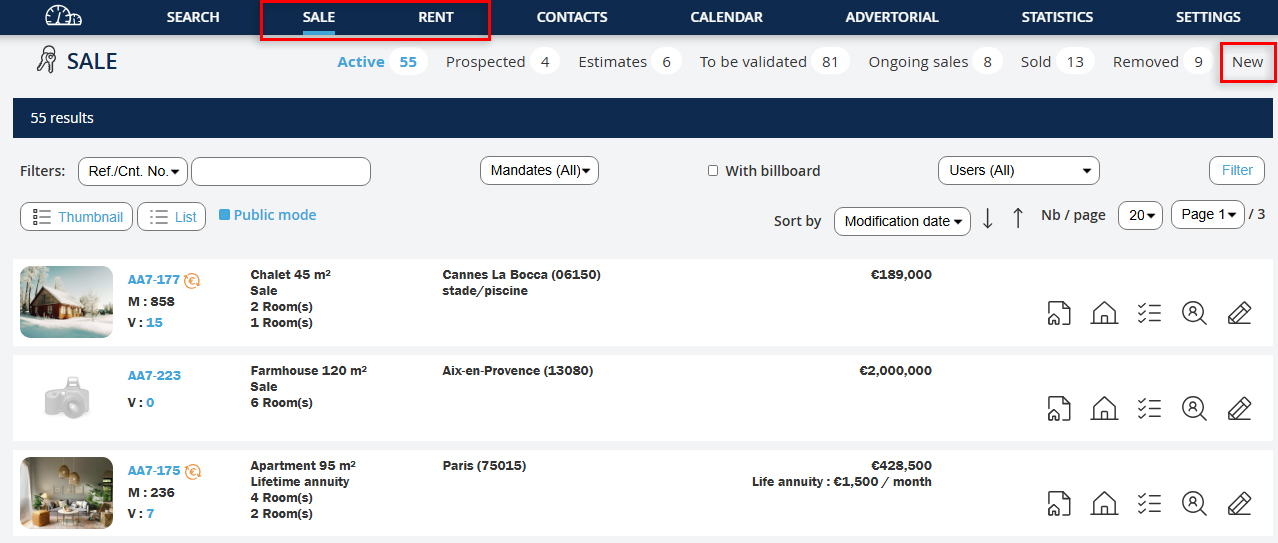
1. In the menu, click on "Sale" or "Rental". 2. In the submenu, click on "New".
1. In the menu, click on "Sale" or "Rental". 2. In the submenu, click on "New".
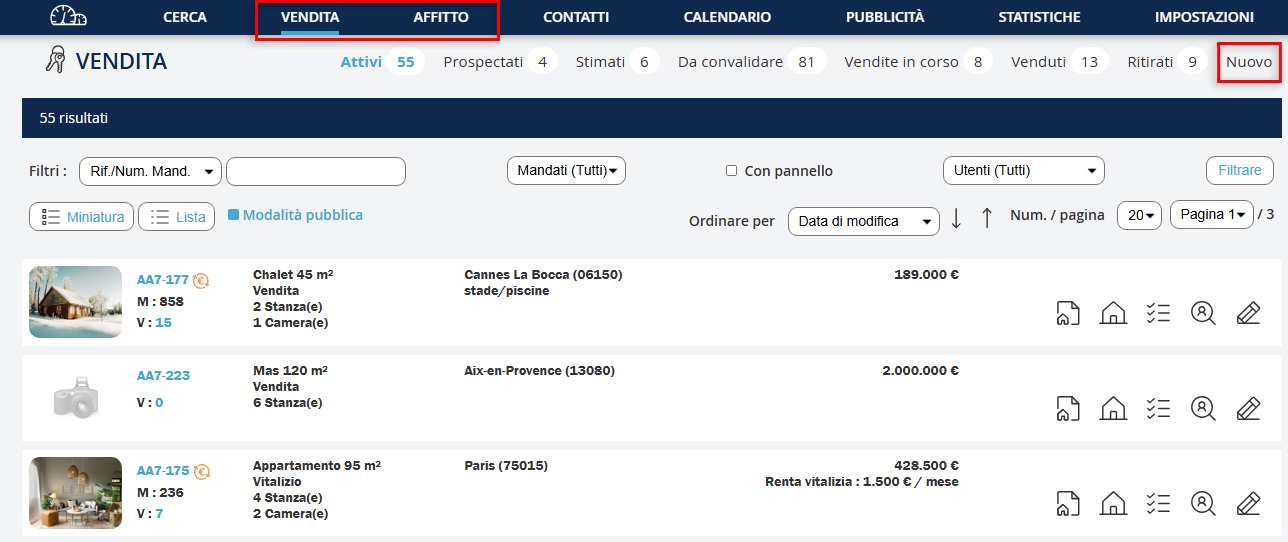
1. Nel menu, fai clic su "Vendita" o "Affitto". 2. Nel sottomenù, fai clic su "Nuovo".
1. No menu, clique em "Venda" ou "Arrendamento". 2. No submenu, clique em "Novo".
1. En el menú, haga clic en "Venta" o "Alquiler". 2. En el submenú, haga clic en "Nuevo".
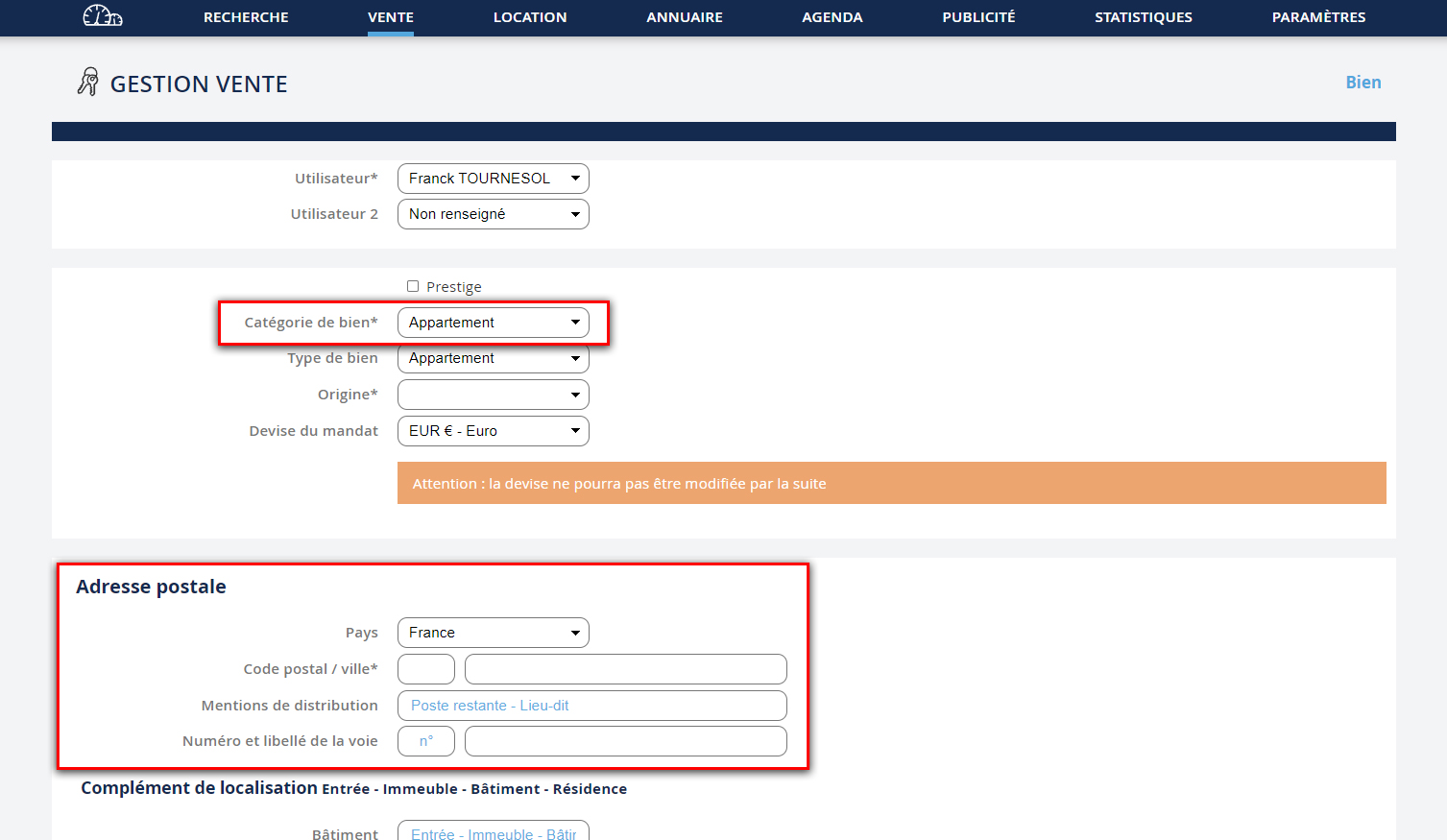
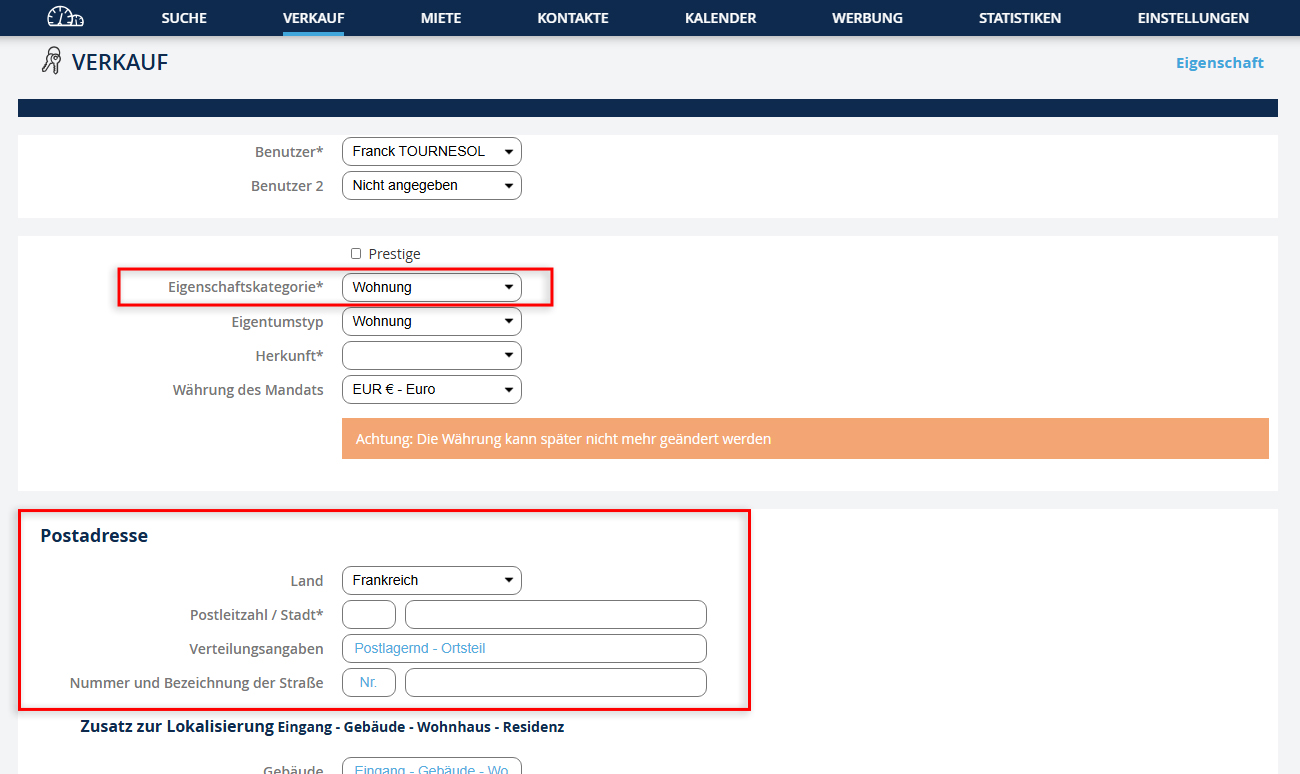
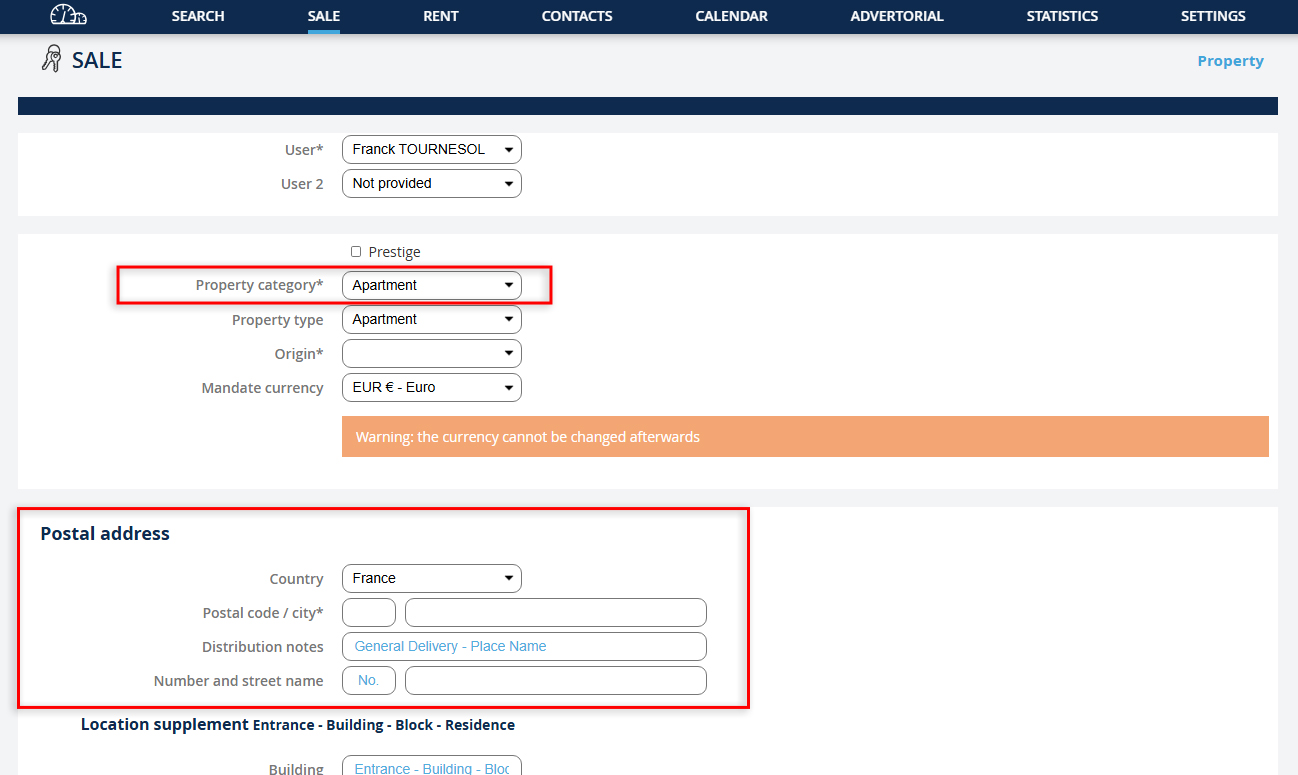
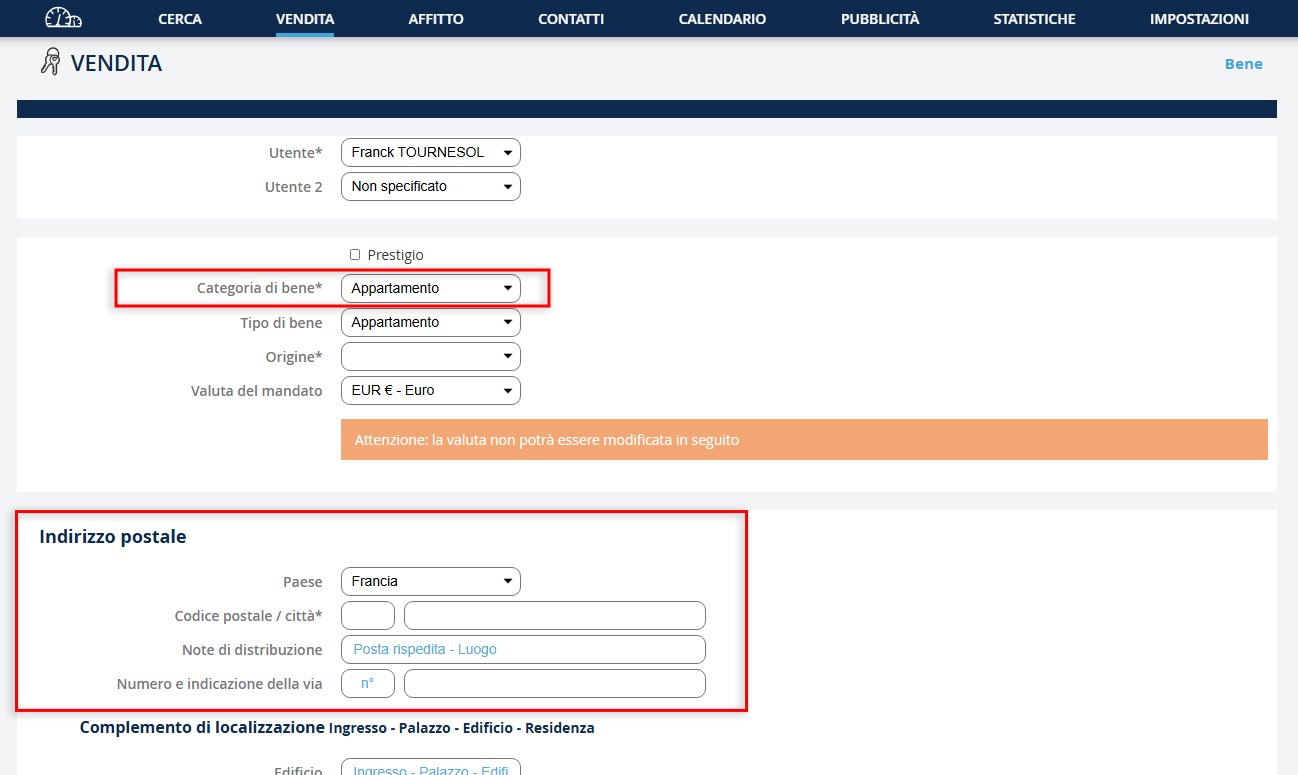
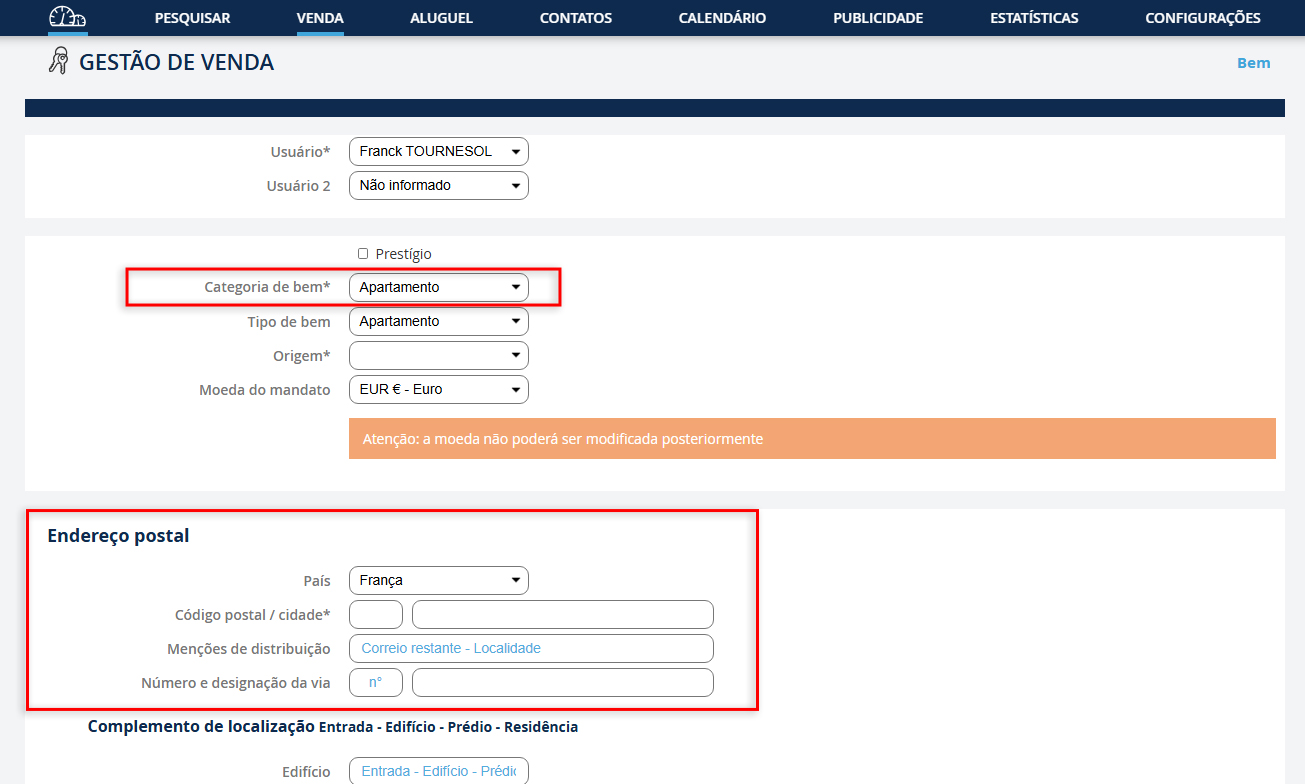
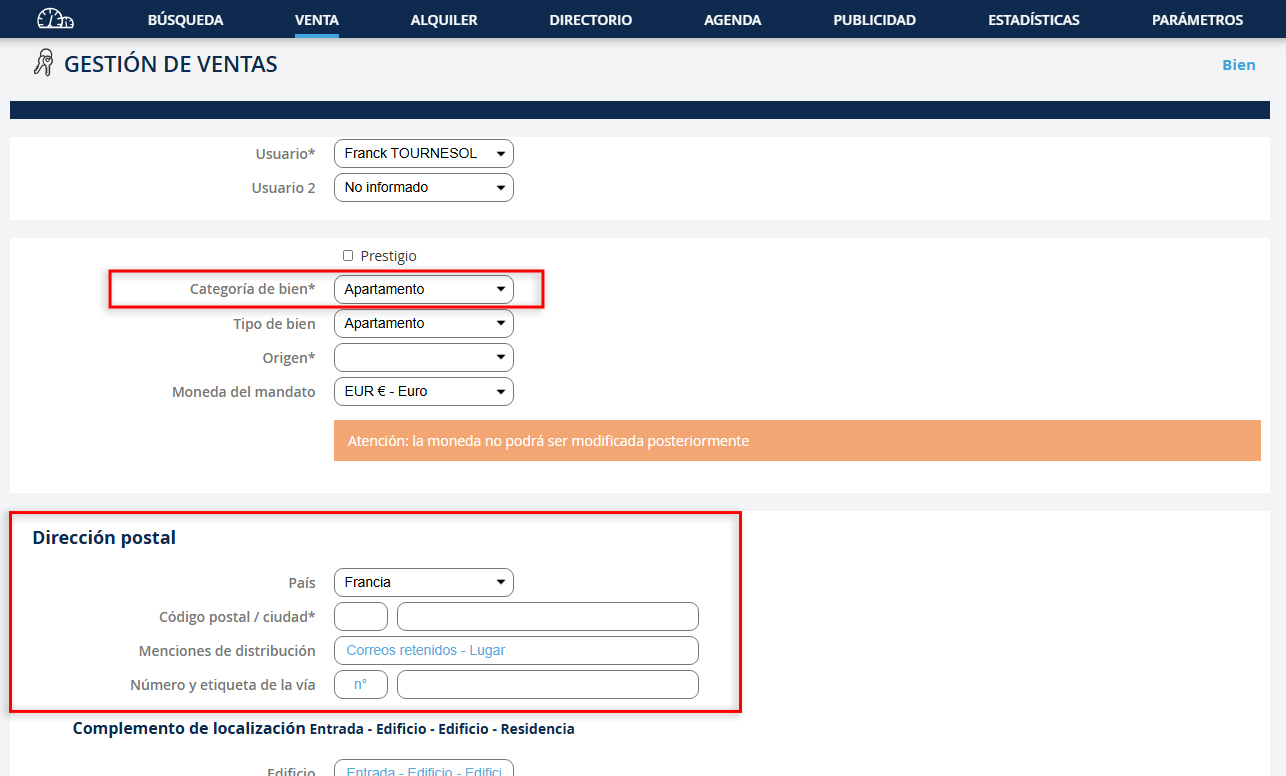
Le formulaire ci-contre s'ouvre Vous devez au minimum : Modifier votre recherche : 1. Choisir la catégorie du bien 2. Compléter les coordonnées postales du bien NB : n’oubliez pas de cliquer sur "Validez" (en bas de la page)
Das Formular öffnet sich Mindestens müssen Sie: Ihre Suche ändern: 1. Wählen Sie die Kategorie der Immobilie 2. Füllen Sie die Postadresse der Immobilie aus NB: Vergessen Sie nicht, auf "Bestätigen" zu klicken (unten auf der Seite)
The form opens At a minimum, you must: Modify your search: 1. Choose the category of the property 2. Complete the postal address of the property NB: Don't forget to click "Submit" (at the bottom of the page)
The form opens At a minimum, you must: Modify your search: 1. Choose the category of the property 2. Complete the postal address of the property NB: Don't forget to click "Submit" (at the bottom of the page)
Si apre il modulo Al minimo, devi: Modificare la tua ricerca: 1. Scegliere la categoria della proprietà 2. Completare l'indirizzo postale della proprietà NB: Non dimenticare di cliccare su "Conferma" (in fondo alla pagina)
O formulário se abre No mínimo, deve: Modificar sua pesquisa: 1. Escolher a categoria do imóvel 2. Completar o endereço postal do imóvel NB: Não se esqueça de clicar em "Validar" (na parte inferior da página)
Se abre el formulario Como mínimo, debes: Modificar tu búsqueda: 1. Elegir la categoría de la propiedad 2. Completar la dirección postal de la propiedad NB: No olvides hacer clic en "Validar" (en la parte inferior de la página)
Avant de continuer la saisie de ce nouveau mandat, le logiciel vérifie si un bien a déjà été enregistré à cette adresse. Afin d’éviter une double saisie, cette fonctionnalité vous permet de reprendre les informations sur la construction et la copropriété.
Before continuing with the entry of this new mandate, the software checks if a property has already been registered at this address. To avoid double entry, this feature allows you to retrieve information about the construction and the co-ownership.
Before continuing with the entry of this new mandate, the software checks if a property has already been registered at this address. To avoid double entry, this feature allows you to retrieve information about the construction and the co-ownership.
Bevor Sie mit der Eingabe dieses neuen Mandats fortfahren, überprüft die Software, ob eine Immobilie bereits unter dieser Adresse registriert wurde. Um eine doppelte Eingabe zu vermeiden, ermöglicht diese Funktion, Informationen über den Bau und das Gemeinschaftseigentum abzurufen.
Prima di continuare con l'inserimento di questo nuovo mandato, il software verifica se una proprietà è già stata registrata a questo indirizzo. Per evitare duplicazioni, questa funzione consente di recuperare informazioni sulla costruzione e la proprietà comune.
Antes de continuar a inserção deste novo mandato, o software verifica se um imóvel já foi registado neste endereço. Para evitar a duplicação de dados, esta funcionalidade permite recuperar as informações sobre a construção e a copropriedade.
Antes de continuar con la entrada de este nuevo mandato, el software verifica si ya se ha registrado una propiedad en esta dirección. Para evitar la duplicación, esta funcionalidad le permite recuperar información sobre la construcción y la comunidad de propietarios.
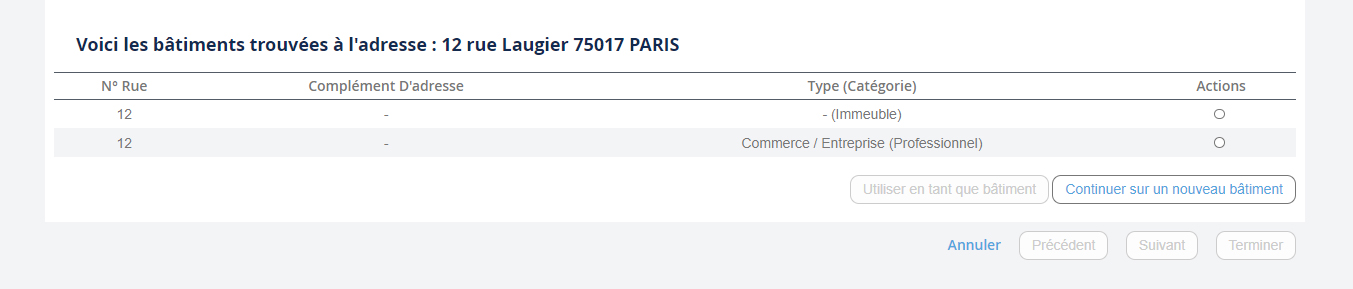





3. Pour reprendre les informations de la construction, cliquez sur l’icône "Utilisé en tant que construction". 4. Si vous voulez enregistrer une nouvelle construction, cliquez sur "Continuer sur une nouvelle construction".
3. Um Baudaten abzurufen, klicken Sie auf das Symbol "Als Bau verwendet". 4. Wenn Sie ein neues Bauwerk registrieren möchten, klicken Sie auf "Weiter mit einem neuen Bauwerk".
3. To retrieve construction information, click on the icon "Used as construction". 4. If you want to register a new construction, click on "Continue with a new construction".
3. To retrieve construction information, click on the icon "Used as construction". 4. If you want to register a new construction, click on "Continue with a new construction".
3. Per recuperare le informazioni sulla costruzione, fai clic sull'icona "Utilizzato come costruzione". 4. Se vuoi registrare una nuova costruzione, fai clic su "Continua con una nuova costruzione".
3. Para recuperar as informações da construção, clique no ícone "Usado como construção". 4. Se você quiser registrar uma nova construção, clique em "Continuar com uma nova construção".
3. Para recuperar la información de la construcción, haga clic en el icono "Usado como construcción". 4. Si desea registrar una nueva construcción, haga clic en "Continuar con una nueva construcción".
Quelle que soit l’hypothèse choisie, voici le formulaire que vous devez remplir. (Image ci-contre). 1. Les critères marqués par * sont obligatoires NB : n’oubliez pas de remplir le formulaire Ajouter un propriétaire 2. Pour valider votre mandat dans les biens actifs, il faut renseigner : - Le type du mandat - Le n° de mandat 3. Enfin, pour obtenir une fiche client la plus complète possible, nous vous conseillons de renseigner un maximum de critères. 4. Pour enregistrer, n’oubliez pas de cliquer sur "Terminer".
Regardless of the chosen option, here is the form you must fill in. (Image on the right). 1. The fields marked with * are mandatory NB: Don't forget to complete the Add an owner form 2. To validate your mandate in the active properties, you must provide: - The type of mandate - The mandate number 3. Finally, to obtain the most complete client sheet possible, we recommend you fill in as many criteria as possible. 4. To save, don't forget to click "Finish".
Regardless of the chosen option, here is the form you must fill in. (Image on the right). 1. The fields marked with * are mandatory NB: Don't forget to complete the Add an owner form 2. To validate your mandate in the active properties, you must provide: - The type of mandate - The mandate number 3. Finally, to obtain the most complete client sheet possible, we recommend you fill in as many criteria as possible. 4. To save, don't forget to click "Finish".
Unabhängig von der gewählten Option ist hier das Formular, das Sie ausfüllen müssen. (Bild rechts). 1. Die mit * markierten Felder sind obligatorisch NB: Vergessen Sie nicht, das Formular Eigentümer hinzufügen auszufüllen 2. Um Ihr Mandat in den aktiven Immobilien zu validieren, müssen Sie folgende Informationen angeben: - Der Mandatstyp - Die Mandatsnummer 3. Schließlich empfehlen wir Ihnen, so viele Kriterien wie möglich anzugeben, um ein möglichst vollständiges Kundenblatt zu erhalten. 4. Um zu speichern, vergessen Sie nicht, auf "Fertigstellen" zu klicken.
Indipendentemente dall'opzione scelta, ecco il modulo che devi compilare. (Immagine a destra). 1. I campi contrassegnati con * sono obbligatori NB: Non dimenticare di completare il modulo Aggiungi un proprietario 2. Per convalidare il tuo mandato nelle proprietà attive, devi fornire: - Il tipo di mandato - Il numero del mandato 3. Infine, per ottenere la scheda cliente più completa possibile, ti consigliamo di inserire quanti più criteri possibile. 4. Per salvare, non dimenticare di cliccare su "Fine".
Independentemente da qual opção escolher, aqui está o formulário que deve preencher. (Imagem ao lado). 1. Os campos marcados com * são obrigatórios NB: Não se esqueça de preencher o formulário Adicionar um proprietário 2. Para validar o seu mandato nas propriedades ativas, deve preencher: - O tipo de mandato - O número do mandato 3. Finalmente, para obter a ficha de cliente mais completa possível, recomendamos que preencha o máximo de critérios possível. 4. Para guardar, não se esqueça de clicar em "Terminar".
Independientemente de la opción elegida, aquí está el formulario que debe completar. (Imagen a la derecha). 1. Los campos marcados con * son obligatorios NB: No olvide completar el formulario Agregar un propietario 2. Para validar su mandato en las propiedades activas, debe proporcionar: - El tipo de mandato - El número de mandato 3. Finalmente, para obtener la ficha del cliente más completa posible, le recomendamos que complete tantos criterios como sea posible. 4. Para guardar, no olvide hacer clic en "Finalizar".