Fiches client intéractives
Interactive Client Sheets
Interactive Client Sheets
Interaktive Kundenblätter
Schede clienti interattive
Fichas de cliente interativas
Hojas de cliente interactivas
Fiches clients envoyées J-2
Client Sheets Sent J-2
Client Sheets Sent J-2
Kundenblätter gesendet J-2
Schede clienti inviate J-2
Fichas de cliente enviadas J-2
Hojas de cliente enviadas J-2
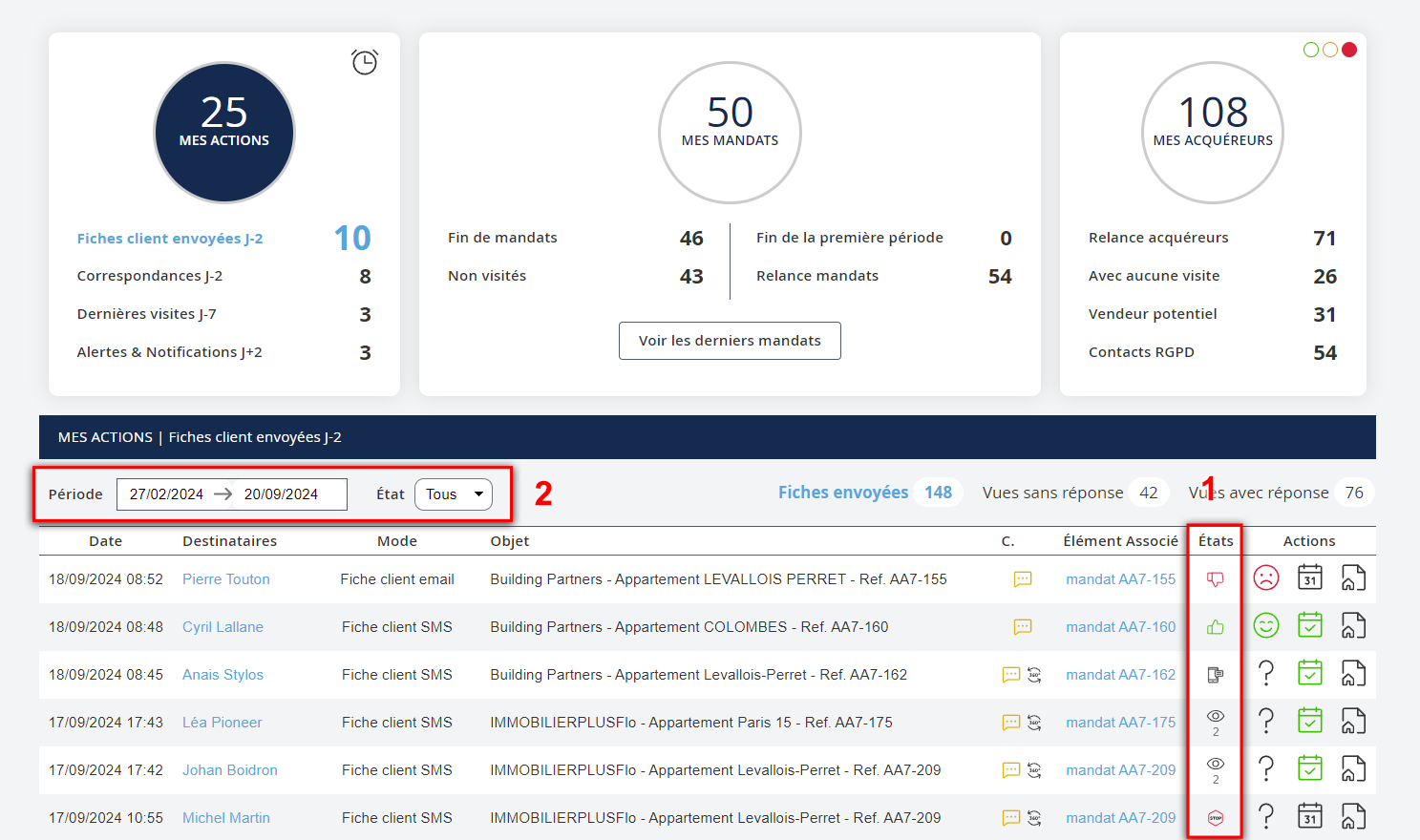
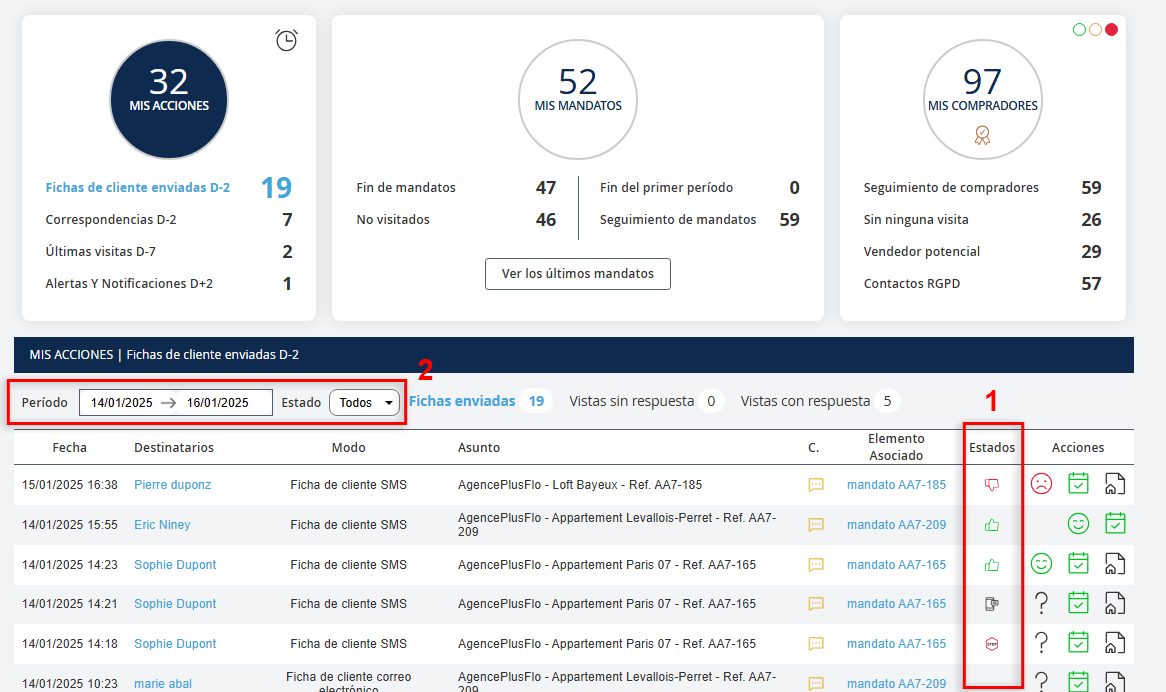
Depuis votre tableau de bord, vous pourrez retrouver la colonne « États » (1). Elle vous permet de voir en un coup d’œil les réponses de vos clients suite à l’envoi d’une fiche, vous pouvez donc suivre en temps réel leur retour. N.B : Cette fonctionnalité est uniquement disponible sur les fiches clients nommées « fiche habitation n°... » du n°1 à n°6. En cliquant dans la partie « Mes Actions », dans Fiches client envoyées J-2, un listing des fiches client envoyées par le négociateur depuis 2 jours apparait (vous pouvez modifier la période au niveau du champ Période (2) si vous souhaitez élargir votre recherche).
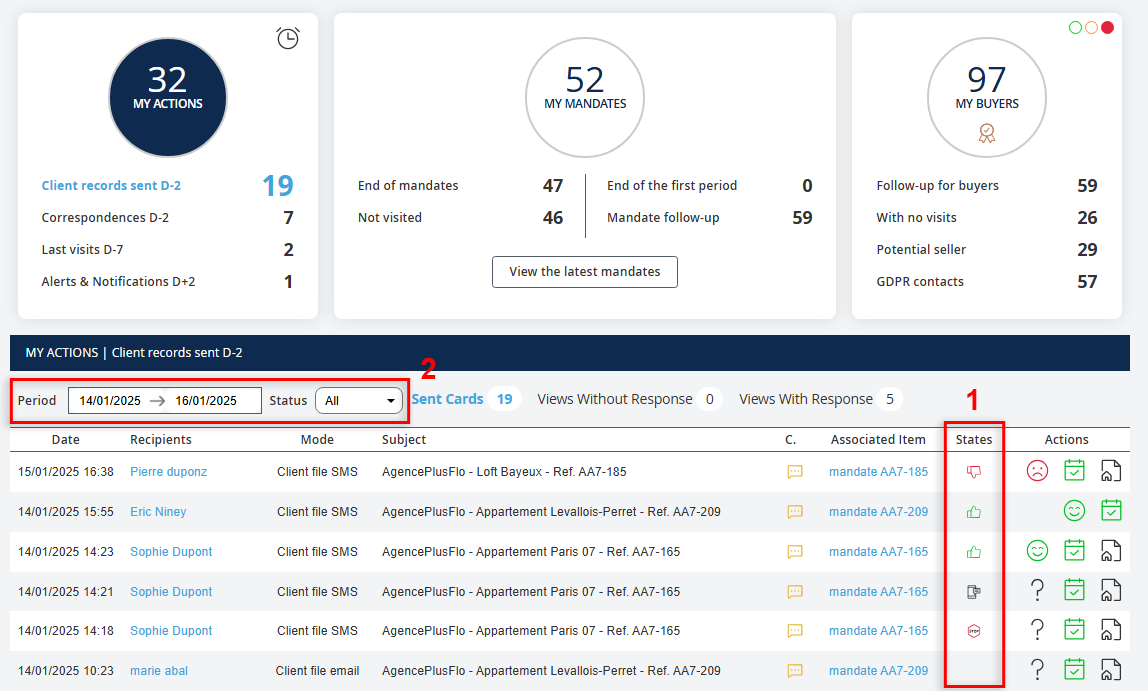
From your dashboard, you will find the "States" column (1). This allows you to see at a glance the responses from your clients following the sending of a sheet, so you can track their responses in real-time. N.B: This feature is only available for client sheets named "property sheet n°..." from n°1 to n°6. By clicking in the "My Actions" section, under Client Sheets Sent J-2, a list of client sheets sent by the negotiator from the last 2 days appears (you can modify the period in the Period (2) field if you wish to broaden your search).
From your dashboard, you will find the "States" column (1). This allows you to see at a glance the responses from your clients following the sending of a sheet, so you can track their responses in real-time. N.B: This feature is only available for client sheets named "property sheet n°..." from n°1 to n°6. By clicking in the "My Actions" section, under Client Sheets Sent J-2, a list of client sheets sent by the negotiator from the last 2 days appears (you can modify the period in the Period (2) field if you wish to broaden your search).
Aus Ihrem Dashboard können Sie die Spalte „Staaten“ (1) finden. Sie ermöglicht es Ihnen, auf einen Blick die Antworten Ihrer Kunden nach dem Versand eines Blattes zu sehen, sodass Sie ihre Rückmeldungen in Echtzeit verfolgen können. Hinweis: Diese Funktion ist nur für Kundenblätter mit dem Namen „Immobilienblatt Nr. ...“ von Nr. 1 bis Nr. 6 verfügbar. Wenn Sie im Abschnitt „Meine Aktionen“ auf „Fiches client envoyées J-2“ klicken, erscheint eine Liste der vom Verhandlungspartner innerhalb der letzten 2 Tage gesendeten Kundenblätter (Sie können den Zeitraum im Feld Periode (2) ändern, wenn Sie Ihre Suche erweitern möchten).
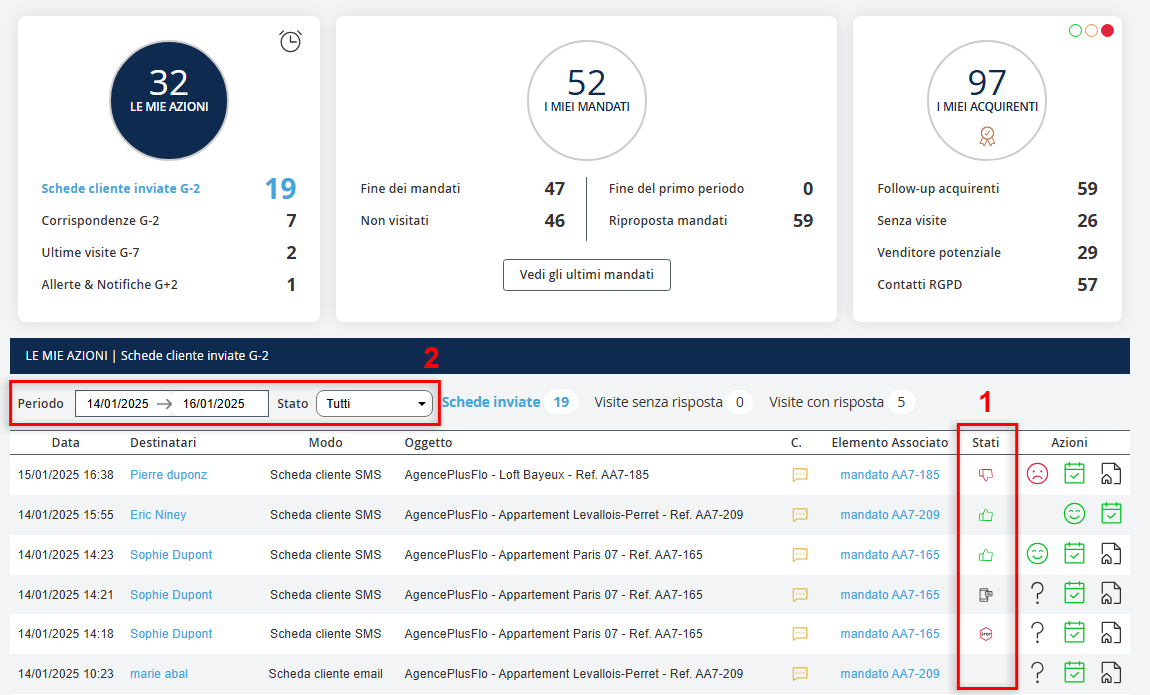
Dalla tua dashboard, troverai la colonna "Stati" (1). Questo ti consente di vedere a colpo d'occhio le risposte dei tuoi clienti dopo l'invio di una scheda, quindi puoi monitorare il loro ritorno in tempo reale. Nota: questa funzionalità è disponibile solo per le schede clienti denominate "scheda abitazione n°..." da n°1 a n°6. Cliccando nella sezione "Le mie azioni", sotto Fiches client envoyées J-2, apparirà un elenco delle schede cliente inviate dal negoziatore negli ultimi 2 giorni (puoi modificare il periodo nel campo Periodo (2) se desideri ampliare la ricerca).
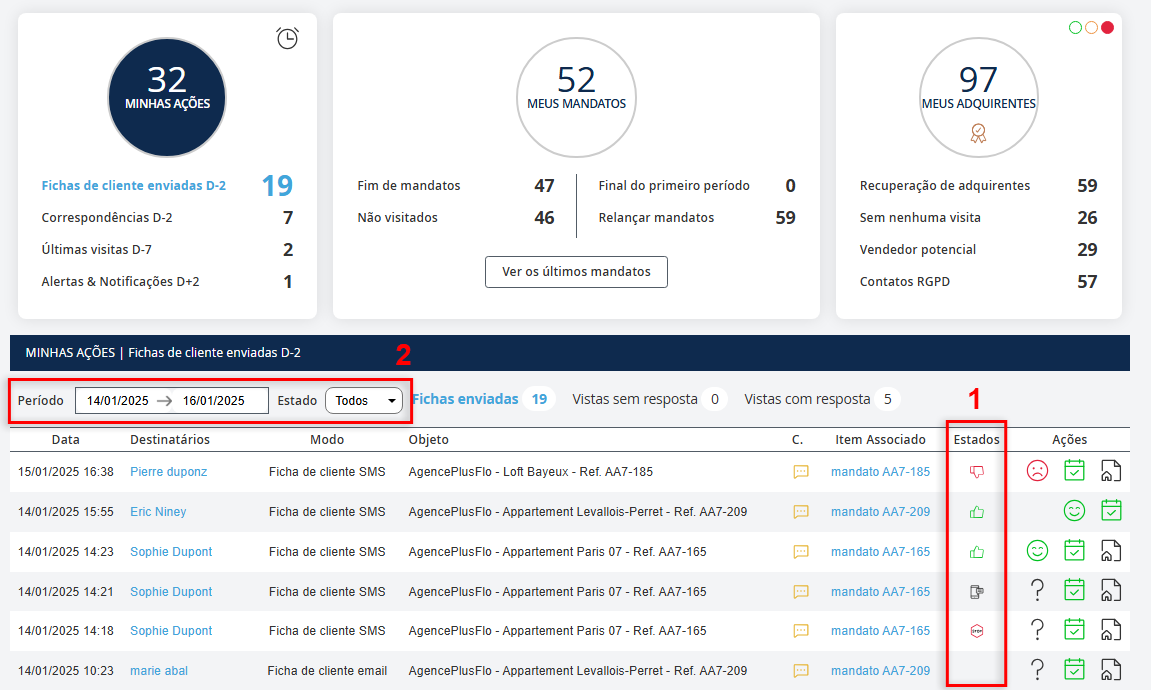
A partir do seu painel de controlo, encontrará a coluna "Estados" (1). Ela permite-lhe ver, de relance, as respostas dos seus clientes após o envio de uma ficha, podendo assim acompanhar o retorno deles em tempo real. Nota: esta funcionalidade está disponível apenas para as fichas de clientes denominadas "ficha de habitação n°..." do n°1 ao n°6. Ao clicar na parte "Minhas Ações", nas Fichas de Cliente Enviadas J-2, aparecerá uma lista das fichas enviadas pelo negociador nos últimos 2 dias (você pode modificar o período no campo Período (2) se quiser alargar a pesquisa).
Desde su tablero, encontrará la columna "Estados" (1). Le permite ver de un vistazo las respuestas de sus clientes después del envío de una ficha, por lo que podrá seguir sus respuestas en tiempo real. Nota: Esta funcionalidad está disponible únicamente para las fichas de cliente denominadas "ficha de vivienda n°..." desde el n°1 hasta el n°6. Al hacer clic en la sección "Mis Acciones", en Fichas de Cliente Enviadas J-2, aparecerá una lista de las fichas enviadas por el negociador en los últimos 2 días (puede modificar el período en el campo Período (2) si desea ampliar la búsqueda).

Fiches interactives
Interactive Sheets
Interactive Sheets
Interaktive Blätter
Schede interattive
Fichas interativas
Hojas interactivas
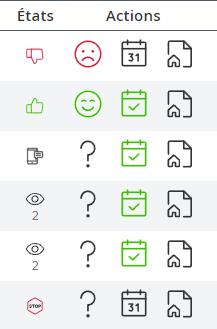


4 pictogrammes pour pouvoir interagir avec vos clients en temps réel :
-  Ce bien ne m'intéresse pas
-
Ce bien ne m'intéresse pas
-  Ce bien m'intéresse
-
Ce bien m'intéresse
-  Je ne suis plus en recherche
-
Je ne suis plus en recherche
-  Le client a vu votre fiche
4 pictograms to interact with your clients in real-time:
- I'm not interested in this property
- I'm interested in this property
- I'm no longer looking
- The client has seen your sheet
4 pictograms to interact with your clients in real-time:
- I'm not interested in this property
- I'm interested in this property
- I'm no longer looking
- The client has seen your sheet
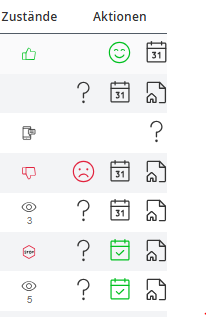
4 Piktogramme, um in Echtzeit mit Ihren Kunden zu interagieren:
- Dieses Objekt interessiert mich nicht
- Dieses Objekt interessiert mich
- Ich suche nicht mehr
- Der Kunde hat Ihr Blatt gesehen
4 pittogrammi per interagire con i tuoi clienti in tempo reale:
- Non sono interessato a questa proprietà
- Sono interessato a questa proprietà
- Non sono più in ricerca
- Il cliente ha visto la tua scheda
4 pictogramas para interagir com os seus clientes em tempo real:
- Este imóvel não me interessa
- Este imóvel interessa-me
- Já não estou à procura
- O cliente viu a sua ficha
4 pictogramas para interactuar con tus clientes en tiempo real:
- Este inmueble no me interesa
- Este inmueble me interesa
- Ya no estoy buscando
- El cliente ha visto tu ficha
Pour intégrer cette fonctionnalité, vous devez ajouter vos nouveaux modèles de fiches : - Allez dans "Paramètres Agence", descendez jusqu'à "Fiche client" - Cliquez sur "Ajouter une fiche" - Sélectionnez "Fiche habitation n°..."
To integrate this feature, you must add your new sheet models: - Go to "Agency Settings", scroll down to "Client Sheet" - Click "Add a Sheet" - Select "Property Sheet n°..."
To integrate this feature, you must add your new sheet models: - Go to "Agency Settings", scroll down to "Client Sheet" - Click "Add a Sheet" - Select "Property Sheet n°..."
Um diese Funktion zu integrieren, müssen Sie Ihre neuen Blätter hinzufügen: - Gehen Sie zu "Agentureinstellungen", scrollen Sie nach unten zu "Kundenblatt" - Klicken Sie auf "Blatt hinzufügen" - Wählen Sie "Immobilienblatt Nr. ..."
Per integrare questa funzionalità, devi aggiungere i tuoi nuovi modelli di schede: - Vai su "Impostazioni Agenzia", scorri fino a "Scheda Cliente" - Clicca su "Aggiungi una scheda" - Seleziona "Scheda Abitazione n°..."
Para integrar esta funcionalidade, deve adicionar os seus novos modelos de fichas: - Vá a "Configurações da Agência", desça até "Ficha de Cliente" - Clique em "Adicionar uma ficha" - Selecione "Ficha de Habitação n°..."
Para integrar esta funcionalidad, debe añadir sus nuevos modelos de fichas: - Vaya a "Configuraciones de la Agencia", desplácese hasta "Ficha de Cliente" - Haga clic en "Añadir una ficha" - Seleccione "Ficha de Vivienda n°..."
Ces fonctionnalités vous permettent en un seul coup d'œil de suivre l’envoie de vos fiches et de visualiser les réponses de vos clients en temps réel, également d'améliorer votre relation et suivi client. Vous avez en temps réel l'évolution du retour client. Il est conseillé d'informer vos clients et de les solliciter à vous répondre pour améliorer la recherche que vous effectuez pour eux.
These features allow you to track the sending of your sheets and view your clients' responses in real-time, as well as improve your client relationship and follow-up. You get real-time updates on client feedback. It is advised to inform your clients and encourage them to respond to improve the search you are conducting for them.
These features allow you to track the sending of your sheets and view your clients' responses in real-time, as well as improve your client relationship and follow-up. You get real-time updates on client feedback. It is advised to inform your clients and encourage them to respond to improve the search you are conducting for them.
Diese Funktionen ermöglichen es Ihnen, das Versenden Ihrer Blätter zu verfolgen und die Antworten Ihrer Kunden in Echtzeit zu visualisieren sowie Ihre Kundenbeziehung und -nachverfolgung zu verbessern. Sie erhalten in Echtzeit Updates zum Kundenfeedback. Es wird empfohlen, Ihre Kunden zu informieren und sie zu ermutigen, zu antworten, um die Recherche, die Sie für sie durchführen, zu verbessern.
Queste funzionalità ti permettono di monitorare l'invio delle tue schede e visualizzare le risposte dei tuoi clienti in tempo reale, oltre a migliorare la tua relazione con il cliente e il follow-up. Ricevi aggiornamenti in tempo reale sul feedback dei clienti. È consigliato informare i tuoi clienti e incoraggiarli a rispondere per migliorare la ricerca che stai effettuando per loro.
Estas funcionalidades permitem-lhe acompanhar o envio das suas fichas e visualizar as respostas dos seus clientes em tempo real, bem como melhorar o seu relacionamento com o cliente e o seguimento. Recebe atualizações em tempo real sobre o feedback do cliente. É aconselhável informar os seus clientes e incentivá-los a responder para melhorar a pesquisa que está a fazer por eles.
Estas funcionalidades le permiten seguir el envío de sus fichas y ver las respuestas de sus clientes en tiempo real, además de mejorar su relación con el cliente y el seguimiento. Obtendrá actualizaciones en tiempo real sobre el feedback del cliente. Se recomienda informar a sus clientes y animarlos a responder para mejorar la búsqueda que está realizando para ellos.